Lesson 6 - Assigning a VoIP Device to a Group
Before you can provision a device for a customer, you must assign it to a group.
To assign a device to a group:
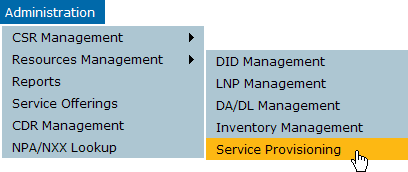
- On the Administration menu, click Resources Management, and then click Service Provisioning.
- On the Service Provisioning page, click Device Management.
The Device Management page is displayed.
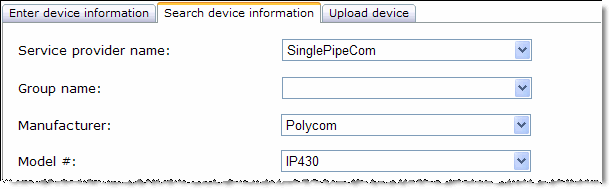
- Click the Search device information tab.
- On the Search device information tab, select the Manufacturer and Model #.
You can also search by MAC address, serial number, or device name. This lesson assumes you just uploaded several devices without the groups associated with them.
- Click Search
The Device Management page is displayed again. In the device listing, scroll until you reach a device with no group defined.
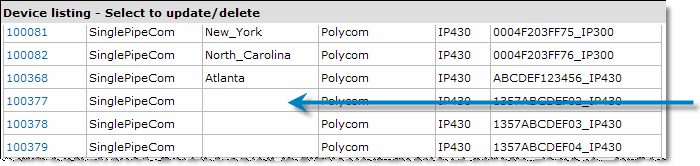
- Click the device ID to view details for the device.
All fields are read-only except for Group name.
- Select the group from the list and then click Submit.
The Device Management page is displayed again, with a success message:

- If desired, repeat this procedure to assign more devices.
Congratulations! You set up your system. You are now ready to start adding customers.
 Lesson 5 - Adding Multiple VoIP Devices